Summary of the issue
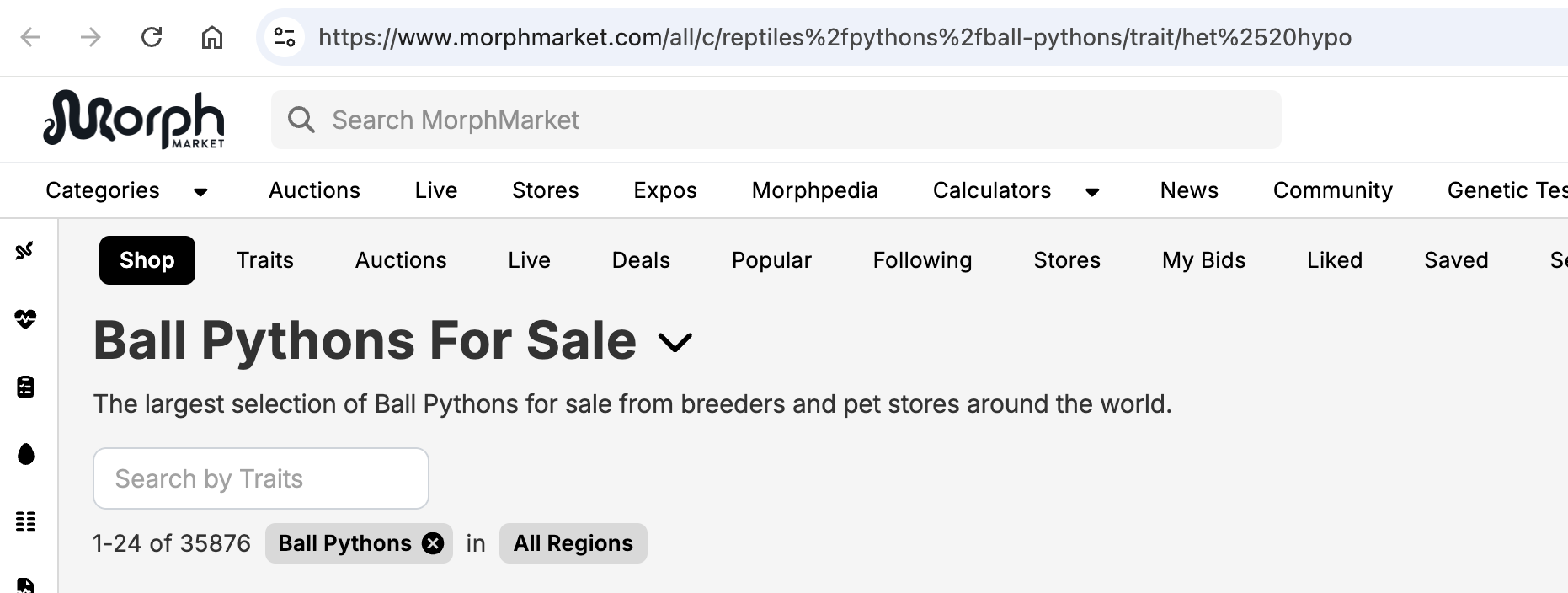
The trait filter is ignored when the trait name contains a space (e.g. “het Hypo”), because the trait segment in the URL is double-encoded (het%2520hypo).
Expected results
Ball Python listings filtered to the “het Hypo” trait (as with trait/het%20hypo or trait/het-hypo, which both show “Hypo Ball Pythons For Sale”).
Actual results
The filter isn’t applied and all ball pythons are listed (page title: “35,400+ Ball Pythons For Sale”). Likely cause: the trait segment is URL-encoded twice (space → %20 → %2520), so the server sees the literal string “het%20hypo”, which matches no trait. Single-word traits like trait/clown work fine, so this probably affects every trait with a space (het Clown, Black Pastel, Yellow Belly, etc.).
Links to affected pages
Broken: https://www.morphmarket.com/all/c/reptiles%2Fpythons%2Fball-pythons/trait/het%2520hypo
Works: https://www.morphmarket.com/all/c/reptiles%2Fpythons%2Fball-pythons/trait/het%20hypo
(The slug form trait/het-hypo also works.)
When did you first notice it?
2026-10-07
Steps to reproduce
- Go to Ball Pythons and filter by the trait “het Hypo”.
- The page navigates to …/ball-pythons/trait/het%2520hypo
- Results are not filtered (all ~35,400 ball pythons shown).
- Change %2520 to %20 (or use het-hypo) in the URL and the filter works.
Additional notes
Suggested fix: encode the trait path segment only once, or use the slug form (het-hypo), which already works.
Device brand
Apple
Device model
MacBook Pro
Browser name
Chrome
Browser version
153.0.8010.55